
Overview
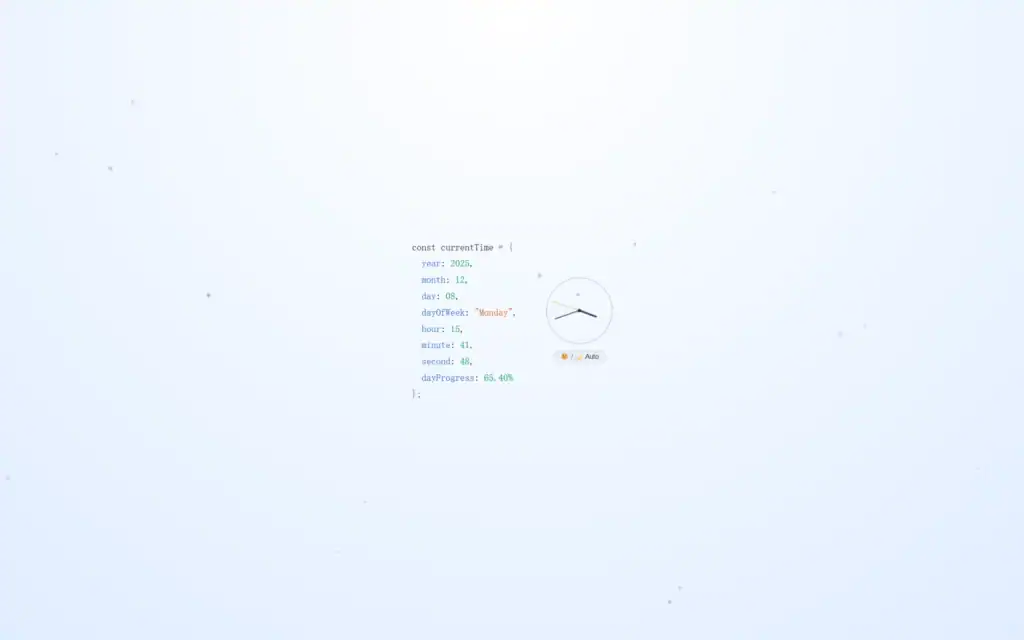
As a person with special mania for dynamic wallpapers, I almost change my wallpaper everyday with wallpaper engine. But due to my running out of my disk space with hundreds of videos or files, I have to find a way out. Then I make a light and mini clock wallpaper with html just like the feature image of this article.
If you want to get access of this wallpaper, just two steps are needed to be followed:
- step_1:Download Lively Wallpaper (a free engine for customized wallpapers and fantastic wallpapers designed by author all over the world)<Download here!>
- step_2:Get the .html<CashStolen/mini_clock_wp>
Then, all you need to do is to click the button “add a wallpaper”, and choose the .html file to add it into your engine. Of course, a few seconds for loading is inevitable.
After that, you can enjoy this light dynamic wallpaper!
Some Details for Designing
The whole project consists of html codes with <style> controlling the overall structure of the wallpaper, css block adjusting some details of style and JavaScripts responsible for making it dynamic.
I aim to create a quiet, minimalist wallpaper that blends naturally into the desktop environment, so it may seems a little “plain”.
The wallpaper consists of several key components below:
1. Analog Clock
The hour, minute, and second hands are implemented using simple <div> elements combined with CSS transforms.
JavaScript updates their rotation every second to reflect the current time.
2. Time Information Panel
A <pre> block displays structured time data, including:
- Year / Month / Day
- Weekday
- Hour / Minute / Second
- dayProgress— a millisecond-accurate percentage showing how much of the day has passed
This section serves as the main visual focus of the wallpaper.
3. Automatic Light/Dark Theme
The wallpaper automatically switches between light and dark modes based on the current hour:
- 7:00–19:00 → Light Mode
- Outside this range → Dark Mode
A manual toggle (Auto / Light / Dark) is also provided.
4. Gradient Background & Particle Effect
Each theme uses a soft gradient background.
A lightweight particle system is rendered on a the background canvas, using a small number of semi-transparent floating dots that add subtle motion without distraction.
To make the particles move randomly:
<script>
function drawParticles() {
      ctx.clearRect(0, 0, w, h);

      //different particles for themes
      const isDark = document.body.classList.contains("dark");
      const color = isDark ? "rgba(148,163,184" : "rgba(120,135,150";

      particles.forEach(p => {
        ctx.beginPath();
        ctx.fillStyle = `${color}, ${p.alpha})`;
        ctx.arc(p.x, p.y, p.r, 0, Math.PI * 2);
        ctx.fill();

        //update the (x,y) of particle
        p.x += p.vx;
        p.y += p.vy;

        //wrap-around
        if (p.x < -20) p.x = w + 20;
        if (p.x > w + 20) p.x = -20;
        if (p.y < -20) p.y = h + 20;
        if (p.y > h + 20) p.y = -20;
      });
</script>Customize It Yourself
You can easily modify the wallpaper to match your personal preferences.
Here are some parts you can adjust:
- Particle count, size, and speed
- Background gradients for light and dark themes
- Clock size, opacity, and styling
- Theme switching rules
- The layout or content of the time information panel
- Any animations or visual effects inside the canvas
All logic and styling are contained in a single HTML file, so you can experiment freely and extend the project however you like. Just explore all the possibilities in the code!
You can find the source code in my git: CashStolen/mini_clock_wp.